Project Overview
There are a lot of different job posting sites out there, and keeping up with them all can be annoying. I thought it’d be a fun weekend project to build an AI-enabled script to look at job postings for me. This project uses some cool python packages to pull job descriptions from websites and feed them to Google Gemini, which evaluates the job based on a pre-baked prompt and sends a notification to my phone if it’s something I’d be interested in. I used Github Actions to run it automatically throughout the week.
This was a fun way to learn some new python tools and to play around with AI tools. It’s not very practical yet - it only looks at one website for job postings and doesn’t have any feedback mechanisms to improve over time - but putting it together was a worthwhile exercise that’s already given me ideas for future projects.
This project is made up of just a few simple files:
scrape_sites.py, a python script using the Playwright package to pull job descriptions from a job posting site.gemini_call.py, a python script which takes that list of job descriptions and sends it in a pre-baked prompt to gemini-2.5-flash for evaluation.- Why gemini-2.5-flash? Because I’m using the free tier of Gemini and I don’t want the AI doing the thinking for me. It’s literally job applications.
script.py, a python script which calls the functions in the other scripts. This is the script where all the action happens, including the code to send interesting job postings directly to my phone.instructions.txtandexamples.txt, text files for the Gemini prompt containing the basic instructions for the AI and some example job descriptions to give it some guidance.job_scout.yml, a config file that sets up the Github Action which runs the script at predetermined times on a virtual machine.
The remainder of this post provides a brief overview of each of these, with the code.
Scrape: Pulling Job Descriptions with Playwright
First, we need a way to pull the job descriptions off of the job posting website. Playwright is a neat python package which can do exactly that.
Playwright is a full suite of browser automation tools aimed towards site testing. It boots up test browsers and takes actions like clicking or hovering over web elements in a way that feels very intuitive.
Here’s the outline of my workflow:
- Open an instance of chromium, and open the webpage I want to pull job descriptions from.
- Create a list of the page elements that contain the individual job descriptions.
- Iterate through that, saving down each job description.
- Return a list of the job descriptions.
(for an overview of how Playwright works, you should check out its documentation directly.)
The best thing about the package is the intuitive debugging: by inserting pauses in the script and running it in headed mode (i.e., with the test browser visible), it’s easy to identify what is and isn’t working. It has a GUI tool which pops up and lets you hover over elements on the webpage to identify the code you need to interact with that web element in your script. Here’s an example:
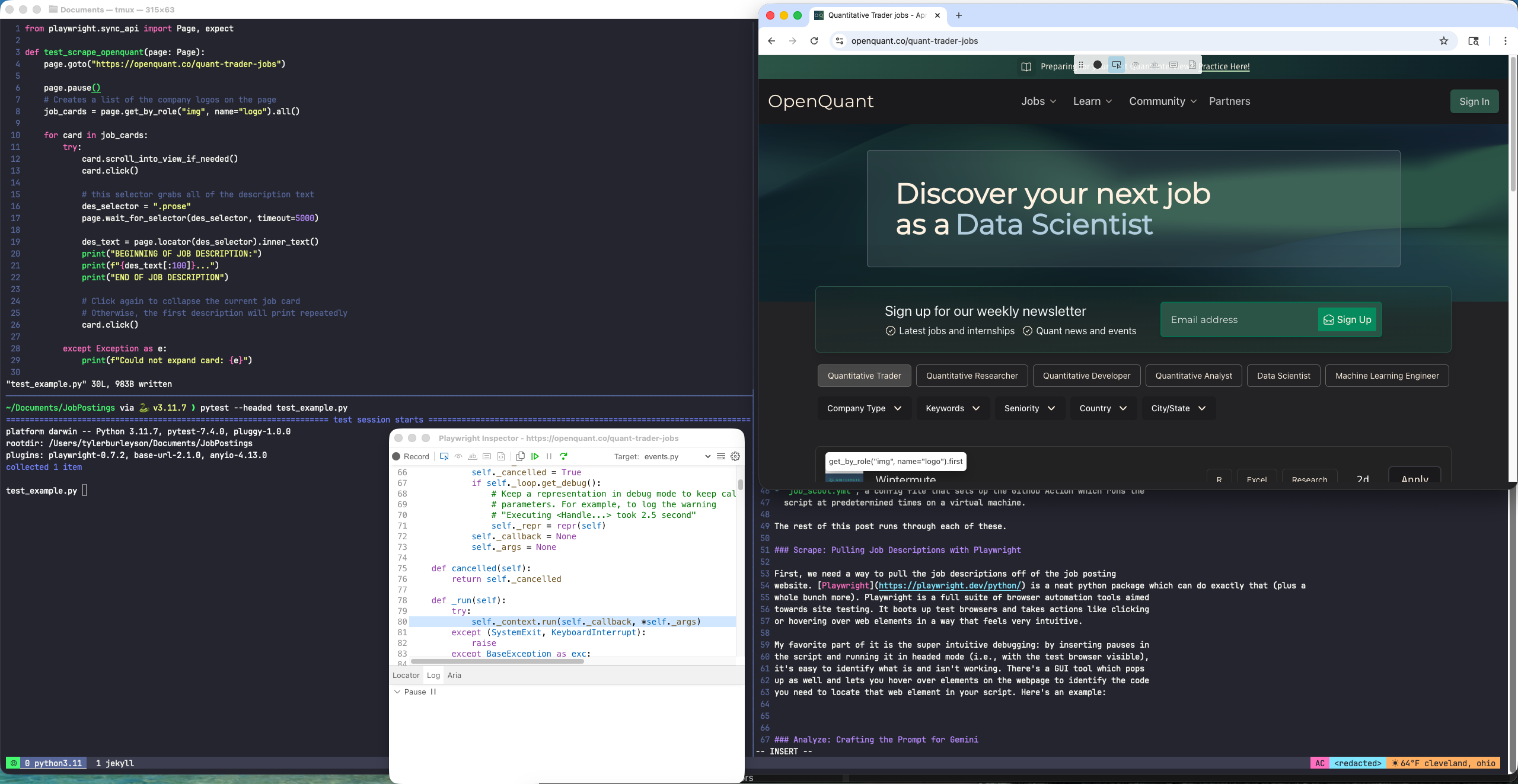
The test_example.py script is in the top left, above the tmux pane which is
running it via pytest.
The Playwright Inspector GUI tool is
below that, open to the python code currently running when we hit the
page.pause() command, which pauses execution of the script. I entered the “pick
locator” mode, which lets you hover your mouse over a web page element and get
the locator function that lets you interact with the element in the
script.
On OpenQuant, the employer logos can be accessed with get_by_role("img",
name="logo") Adding .all() on the end of that creates a list of all
those logos. Once I have that list, I can tell Playwright to click on each logo, wait for the
job description to load, and put the text into a list.
The screenshot shows some test code I put together to figure out how the package works. Here’s the full script:
from playwright.sync_api import Page, expect, sync_playwright

def scrape_openquant():
    with sync_playwright() as p:
        browser = p.chromium.launch(headless=True)
        page = browser.new_page()
        page.goto("https://openquant.co/quant-trader-jobs")

        # Creates a list of the company logos on the page
        job_cards = page.get_by_role("img", name="logo").all()

        # The function returns this list of job descriptions
        job_des = []

        for card in job_cards:
            try:
                card.scroll_into_view_if_needed()
                card.click()

                # this selector grabs all of the description text
                des_selector = ".prose"
                page.wait_for_selector(des_selector, timeout=5000)

                des_text = page.locator(des_selector).inner_text()

                # Add the job description to the list
                job_des.append(des_text)

                #click again to collapse the current job card
                # Otherwise, the first description will print repeatedly
                card.click()

            except Exception as e:
                print(f"Could not expand card: {e}")

        browser.close()

    return job_des
The GUI interface was super helpful for figuring out how to reference each of the job posting elements on the site. I couldn’t make heads or tails of the site structure just poking around in inspect element, so this was crucial in getting the script to work.
You might point out that I could just ask Gemini to pull jobs from a specific website for me. And you’d be right, but I have a few reasons for choosing to do it this way. For one, I learned a new tool while setting this up which may come in handy on future projects. Doing it this way, I also know for a fact I’m reviewing all the jobs on a specific site that I know will have good leads. AI is famously a black box, so this way of doing things helps me maintain some control.
Analyze: Crafting the Prompt for Gemini
Once I gather the job descriptions, I want to use Gemini to evaluate them for me. Gemini should “read” each of the job descriptions to (i) summarize it, and (ii) give it a 0-10 “match score” for how well it fits what I’m looking for.
To facilitate that, I provide it with a description of myself and what I’m interested in. I also provide it with several example job postings to get it started.
This provides an informal feedback mechanism; if I find more job postings I’m really interested in, I can add them to the examples for the prompt and dial it in over time. What I’d really like to do is give it feedback after each run on how well it scored each of the job opportunities. If I end up adding that feature, I’ll write a follow up to this post.
Google Gemini has an easy to use python package you can use to automatically send prompts. It requires an API key, but Google’s free tier is generous enough to let me run this prompt regularly without needing to upgrade to a paid account.
I’m batching the job descriptions into one, long prompt in order to make fewer requests. In testing this project, I made four requests peaking at about 11k tokens per minute. That compares to a daily limit of 20 requests and a rate limit of 250k tokens per minute on the free tier at time of writing. The prompt is wordy but it doesn’t require the fancy, expensive models. It’s a pretty light lift.
Here’s the code:
import os
from google import genai
from google.genai import types

# provide my Gemini API key
# In practice, this is set up as a Github Secret
client = genai.Client(api_key=os.environ.get("GEMINI_API_KEY"))

def evaluate_jobs_with_gemini(job_descriptions, base_instructions, examples):
    # job_descriptions is a list of strings containing job descriptions
    # base_instructions is a string read in from a text file
    # examples is a stirng read in from a text file

    formatted_jobs = "\n\n".join([f"JOB#{i}:\n{text}" for i, text in enumerate(job_descriptions)])

    # Construct the prompt
    prompt = f"""
    {base_instructions}

    Here are some examples of jobs I like:
    {examples}

    Please evaluate the following {len(job_descriptions)} job postings.
    return a JSON list of objects Each object must have:
    - "opportunity": The name of the company and the title of the role (e.g.,
      "Jane Street Trading Internship - Summer 2027")
    - "score": A match score from 0-10. The long-run average score should be 5.
    - "reasoning": An explanation for the score.
    - "should_notify": Boolean (true if score > 6).

    JOBS TO EVALUATE:
    {formatted_jobs}
    """

    # 3. Call the model
    response = client.models.generate_content(
        model="gemini-2.5-flash",
        config={"response_mime_type": "application/json"},
        contents=prompt
    )

    return response.text
The output is formatted in JSON. I set it up that way to make it easy to access
the should_notify boolean later on, where it’s used to decide whether or not
to send a notification to my phone about the posting.
Notify: Putting It All Together
Building the Prompt & Calling the Function
In the code above, I’m passing my instructions into the prompt as arguments. I did that so I can make tweaks to the specifics of the prompt without having to edit the actual script. That keeps the code separate while letting me make small tweaks in a simple .txt file.
Loading those in is pretty simple with open() when I run the script locally.
Here’s how I read in the text files:
import os
from pathlib import Path

# set the base directory explicitly
# this is necessary once the code is on github
BASE_DIR = PATH(__name__).resolve().parent

def load_text_file(file_name):
    path = BASE_DIR / file_name
    return path.read_text(encoding="utf-8")

# Make sure instructions.txt and examples.text are saved in the same folder
# as the script running this code.
instructions = load_text_file("instructions.txt")
examples = load_text_file("examples.txt")
Next, call our functions:
import json
import scrape_sites # this is the file with the function to pull job descriptions
import gemini_call # this is the file with the function that calls Gemini

jobs_list = scrape_sites.scrape_openquant()
raw_json = gemini_call.evaluate_jobs_with_gemini(jobs_list, instructions, examples)
evaluations = json.loads(raw_json)
Texting Myself with ntfy
Gemini recommended I use nfty.sh, a nifty tool for sending push notifications to its related iPhone app. It’s a beautifully simple tool: you set a topic name and then use your favorite programming language (or even just curl) to send a message to anyone who subscribes to that topic. I subscribed to my topic name on the app on my phone, so I get a notification every time the script sends me a job posting.
The topic names are not password-protected, so anyone can send anything to any topic name they know. I set up my topic name as a Github Secret for that reason.
Here’s the full script to pull the job descriptions, send them to Gemini, and then send the best ones according to Gemini directly to your phone:
import os
import json
import gemini_call
import scrape_sites
from pathlib import Path
import requests

ntfy_topic = os.environ.get("NTFY_TOPIC")

BASE_DIR = Path(__name__).resolve().parent

def load_text_file(file_name):
    path = BASE_DIR / file_name
    return path.read_text(encoding="utf-8")

instructions = load_text_file("instructions.txt")
examples = load_text_file("examples.txt")

jobs_list = scrape_sites.scrape_openquant()

raw_json = gemini_call.evaluate_jobs_with_gemini(jobs_list, instructions, examples)
evaluations = json.loads(raw_json)

for eva in evaluations:
    if eva['should_notify']:
        requests.post(f"https://ntfy.sh/{ntfy_topic}", json=eva)
And here’s what the notification looks like on my phone:
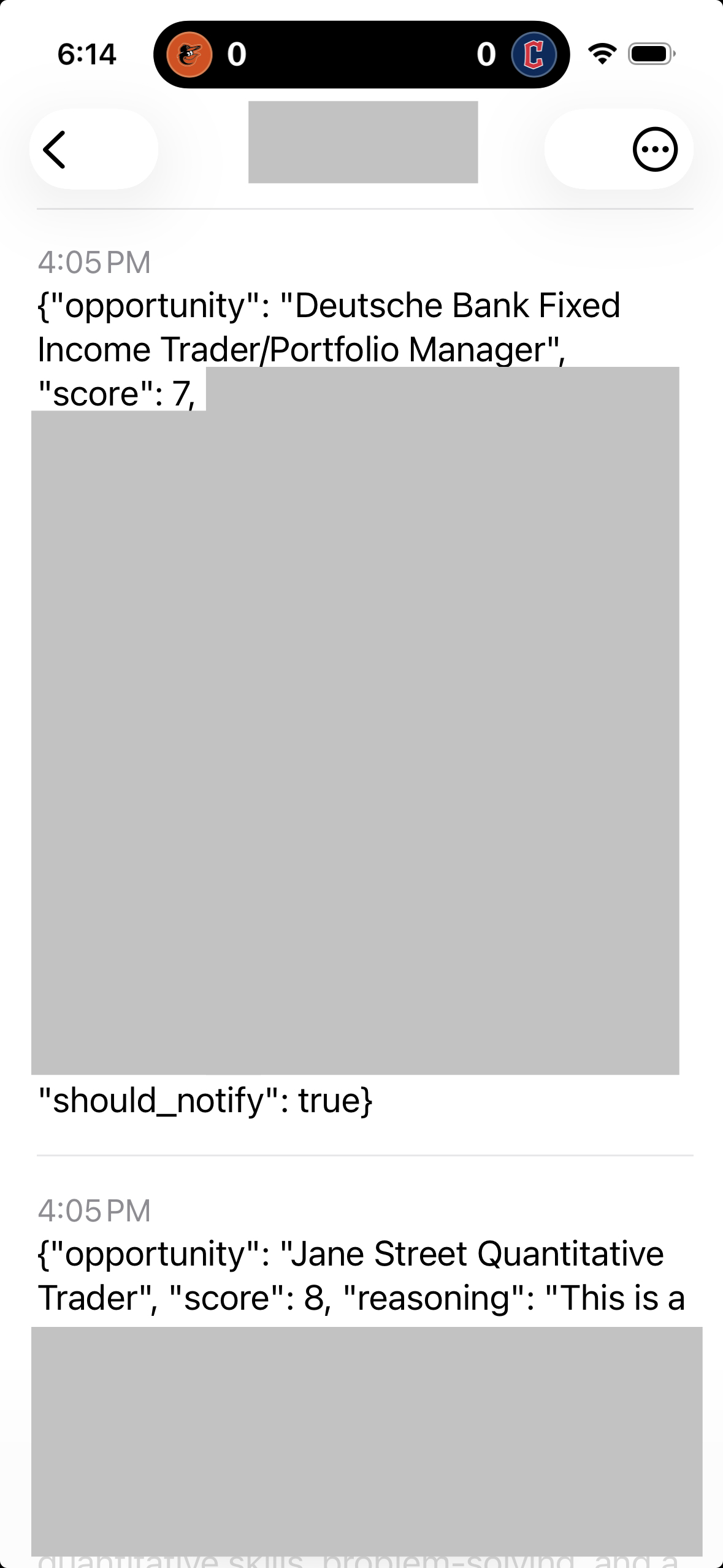
I redacted the channel name so you can’t spam me with notifications, and Gemini’s summary of the role to keep what I’m looking for close to the chest.
Github Actions Workflow
With what we’ve described so far, I can run the script manually on my own machine. I’d like to have it run automatically on a schedule - otherwise, I may as well just check the job board myself.
One easy, free tool for this is Github Actions. All I needed to do was:
- Create a private github repo, and add my Gemini API key and ntfy.sh topic as secrets.
- Put together a workflow file, a set of instructions for Github Actions in YAML format. It needs to be saved in /.github/workflow for Github Actions to work.
- Push my scripts, text files, and workflow file to the repo.
Here’s my full script, which is almost unchanged from what Gemini gave me. I did have to change the timing to the early morning in the Eastern time zone; I initially set it at 9am ET, which resulted in the job failing due to too many requests going to Gemini at that time (surprise surprise).
Name: AI Job Scout

on:
  schedule:
    - cron: '11 10 * * 1,3,5' # runs at 10:11am UTC (5:11am ET) on Mon, Wed, Fri
  workflow_dispatch: # allows the job to be run manually

# This section sets the job parameters
jobs:
  scrape_and_analyze:
    runs-on: ubuntu-latest
    steps:
      - name: Checkout code
        uses: actions/checkout@v4

      - name: Set up Python
        uses: actions/setup-python@v5
        with:
          python-version: '3.11'

      - name: Install dependencies
        run: |
          python -m pip install --upgrade pip
          pip install -r requirements.txt

      - name: Install Playwright Browsers
        run: |
          python -m playwright install --with-deps chromium

      - name: Run Job Scout
        env:
          GEMINI_API_KEY: $
          NTFY_TOPIC: $
        run: |
          python script.py
And with that, we’re done. The script will run automatically three times a week, sending me notifications for any interesting job postings. This’ll become very useful once I’m searching for internships and full time positions. In the meantime, it’ll help me keep up with what’s on offer.
Bonus: Script to Gather Internship Programs
I keep a tracker of companies I may be interested in applying to in a google doc. While all of the above gives me a good way to pull job postings from curated websites I know I want to review, it leaves plenty of blind spots. I’m supplementing it with an AI-enabled script to survey my full lists of potential employers and gather info on their internship programs. It’s not that useful right now, since most programs haven’t posted the applications, but I expect it’ll come in handy this summer and fall.
import os
import json
import requests
import pandas as pd
from google import genai
from google.genai import types
from pathlib import Path
from datetime import datetime

# provide my Gemini API key and ntfy topic
# these are stored either in my local environment (if run locally),
# or as github secrets (if run by Github Actions)
client = genai.Client(api_key=os.environ.get("GEMINI_API_KEY"))
ntfy_topic = os.environ.get("NTFY_TOPIC")

# Load in the text files
BASE_DIR = Path(__name__).resolve().parent

def load_text_file(file_name):
    path = BASE_DIR / file_name
    return path.read_text(encoding="utf-8")

# there are four types of firms I'm tracking, written in this list
firm_types = ['asset_mgmt', 'hedge_funds', 'prop_trading', 'sell_side']

firm_lists = [load_text_file(f"{x}.txt") for x in firm_types]

instructions = load_text_file("weekly_instructions.txt")

# Send the prompt to Gemini
def global_search_prompt(firms_list, base_instructions):
    # firms_list is a string with a list of firms to survey
    # base_instructions is a string read in from a text file

    # Construct the prompt
    prompt = f"""
    {base_instructions}

    Search for Summer 2027 internships at the following {len(firms_list)} firms.
    Return a JSON list of objects, one for each firm.
    Each object must have:
    - "company": The name of the company.
    - "location": The city where the internship is located.
    - "program_title": The title of the program (e.g., Quantitative Trading
      Internship).
    - "description": A description of the firm, including what asset classes
      they're most associated with and a summary of their market reputation.
      Also describe the internship program, and provide an explanation of the
      score (see below).
    - "domestic": Boolean (true only if the posting explicitly does not sponsor
      international applicants).
    - "score": A match score from 0-10. Be a harsh grader.
    - "posted": Boolean (true if the internship is currently taking applications.)

    LIST OF FIRMS:
    {firms_list}
    """

    # Call the model
    response = client.models.generate_content(
        model="gemini-2.5-flash",
        config={"response_mime_type": "application/json"},
        contents=prompt
    )

    return response.text

results = [global_search_prompt(x, instructions) for x in firm_lists]

for i, x in enumerate(results):

    # this try-except block will print the results to a .txt in case Gemini
    # messes up the json formatting (which happens from time to time)
    try:
        df = pd.read_json(x)
        df_sorted = df.sort_values(by=["score","domestic", "posted"], ascending=False)
        df_sorted.to_csv(f"{firm_types[i]}_results.csv", mode='a')
    except:
        with open(f"{firm_types[i]}_results.txt", "a") as f:
            f.write(x)